Code Generation
After completing the problem definition, you need to use OPTIMake's code generation function to generate C/C++ code for the problem definition and solver. This chapter mainly introduces how to configure code generation.
The code generation workflow of OPTIMake is as follows:
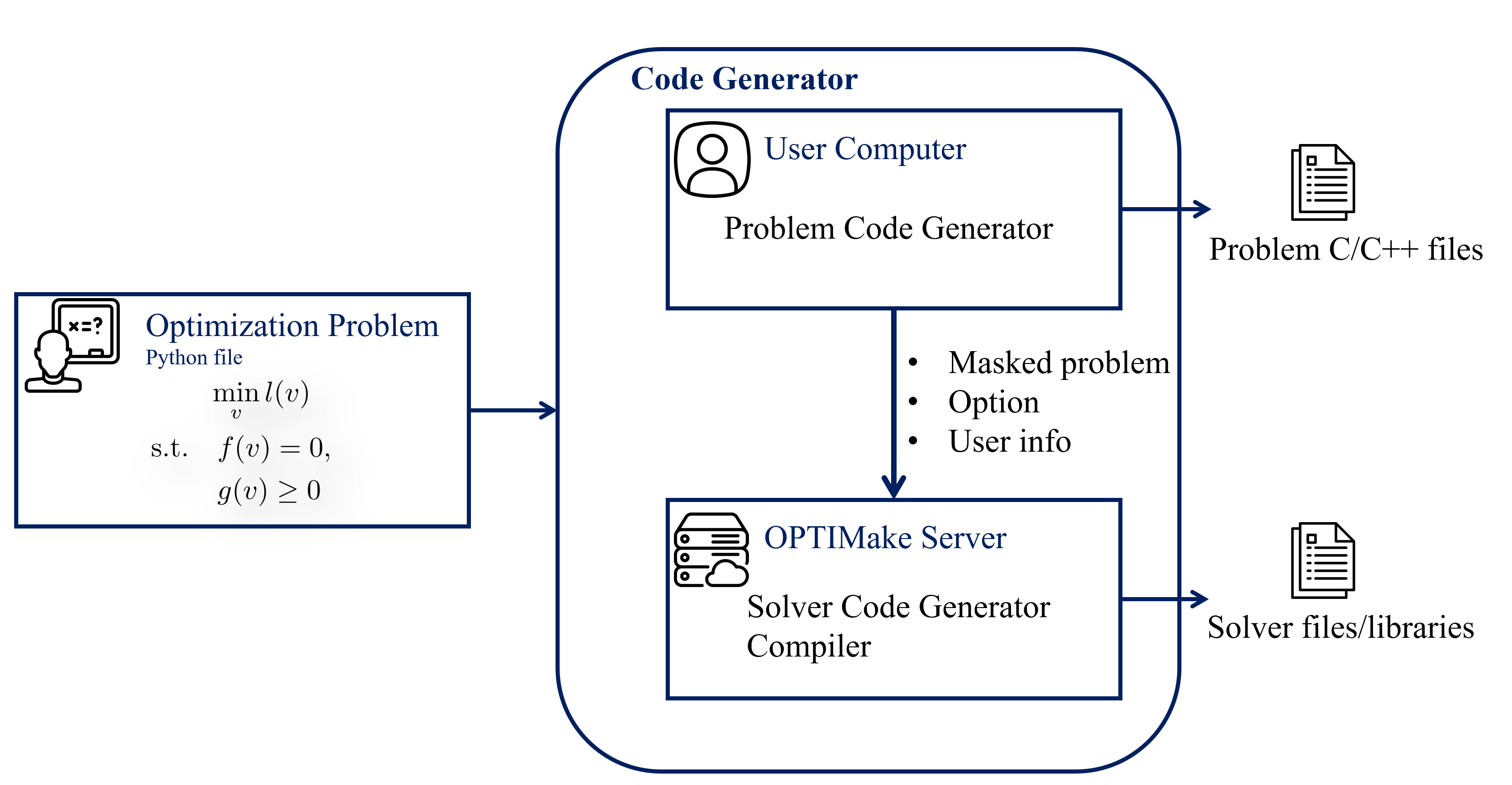
Code generation consists of two steps: problem generation and solver generation:
- Problem generation: Generates problem-related functions, such as constraint function values and their gradients. This process is performed locally on the user's machine
- Solver generation: Generates the solver for the problem. This process is performed on the OPTIMake server (internet connection required). When calling the generated solver, no internet connection is required
After problem generation is completed locally, the client sends a desensitized version of the problem to the OPTIMake server for solver generation, meaning the user's specific problem definition and data are not sent to the OPTIMake server. All uploaded data is transparent to the user (the client upload code is open source). The following is the specific data sent to the server:
- Desensitized problem (masked_multi_stage_problem):
- Dimensions
- Sparsity: 0/1 matrices used for sparse solving acceleration
- Properties (e.g., whether it is linear): used for selecting better solving strategies
- User information (user_info), used for license check:
- MAC address
- Computer name
- OS
- CPU
- Code generation option (codegen_option): defines the solver type to be generated, hardware platform, and other information
Code Generation
Below is an introduction to the code generation options, which can be mainly categorized into generation configuration, solving algorithm, performance, and code style.
Generation Configuration
codegen_path: Code generation path (default is a folder with the same name as the problem in the current directory)
overwrite: Whether to overwrite previously generated code (default True)
verbose: Whether to print code generation related information (default False)
source_file_extension: Source file extension of the generated code
- 'c' (default)
- 'cpp'
- 'cxx'
- 'cc'
header_file_extension: Header file extension of the generated code
- 'h' (default)
- 'hpp'
- 'hxx'
- 'hh'
enable_printing: Whether to enable printing functionality
- True: The generated code includes printf functions. When the solver's print_level is set to non-zero, the solver can print solving status (default)
- False: The generated code does not include printf functions. Even when the solver's print_level is set to non-zero, the solver cannot print solving status
enable_timing: Whether to include timing functionality in the generated code (default True)
enable_serialization: Whether to enable serialization functionality (can store solver settings as binary files and read them for reproduction, default False)
platform: The platform and compiler for running the solver
- 'host' (default): Uses the current computer's platform. OPTIMake automatically detects the current computer's operating system and selects from the following specific platforms
- 'linux-x86_64-gcc': Linux x86_64 platform, gcc compiler
- 'windows-x86_64-mingw': Windows x86_64 platform, mingw compiler
- 'windows-x86_64-msvc': Windows x86_64 platform, msvc (Microsoft Visual C++) compiler
- 'windows-x86-msvc': Windows x86 platform, msvc (Microsoft Visual C++) compiler
- 'linux-arm64-gcc': Linux ARM64 platform, gcc compiler
- 'linux-armv7-gcc': Linux ARMv7a platform, gcc compiler
- 'embedded-armv7-gcc': Embedded ARMv7a platform, gcc compiler
- 'qnx7-arm64-gcc': QNX7 ARM64 platform, gcc compiler
- 'qnx8-arm64-gcc': QNX8 ARM64 platform, gcc compiler
- 'vxworks-arm64-clang': VxWorks ARM64 platform, clang compiler
OPTIMake uses cross-compilation to generate solvers for different platforms, supporting solver generation for multiple platforms.
If the above platforms or compilers do not meet your needs, please contact OPTIMake for support.
lib_type
- 'static': Generate a static library for the solver (default)
- 'shared': Generate a shared (dynamic) library for the solver
Solving Algorithm
solver: Solving algorithm
- 'pdipm': primal-dual interior-point method (default)
- 'sqp': sequential quadratic programming method
'pdipm'is suitable for the vast majority of problems, with good robustness and efficiency'sqp'is suitable for problems with weak nonlinearity or problems where function evaluation is very time-consuming
hessian_approximation: Hessian computation method
- 'exact' (default)
- 'gauss-newton'
- 'bfgs'
- When the objective is of least squares type with small residuals, or the problem has low nonlinearity, choose
'gauss-newton'. When the above conditions do not hold and the Hessian is needed for convergence, choose'exact'or'bfgs'. - When the Hessian is easy to obtain (e.g., the problem is defined symbolically and OPTIMake automatically generates the exact Hessian),
'exact'is generally more efficient and robust than'bfgs' - OPTIMake cannot automatically generate the exact Hessian in the following cases:
- External functions, in which case the Hessian must be provided by the user. (See Modeling Interfaces > External C/C++ Function Support for external functions in OPTIMake)
differential_equationwithdiscretization_methodset to'irk2'or'irk4'
bfgs_init_hessian: Initial Hessian value for BFGS. Can be a constant or a symmetric matrix of dimension [nv, nv] as a function of parameter p (passed as a list, where each element is a list of dimension nv); the default value is the identity matrix
The Hessian values computed during solving are stored in the workspace. You can access this value after solving to optimize the selection of bfgs_init_hessian.
Performance
optimization_level: Compilation optimization level
- 0,1,2,3 (default 3)
common_subexpression_elimination: Extract common subexpressions to reduce computation
- 'on'
- 'off'
- 'auto' (default)
This may change the computation order. When the problem is numerically sensitive, you can try different options for solving.
simplify_expression: Simplify expressions, which may cause the local problem generation time to be too long
- True
- False (default)
default_tolerance_level: Default solving tolerance (tolerance can also be manually adjusted after setting)
- 'low'
- 'medium' (default)
- 'high'
simd: Whether to enable SIMD acceleration
- 'off'
- 'neon' : Enable NEON instruction set acceleration (only available when
platformis ARM architecture)
linear_solver: Method for solving linear systems
- 'general': Suitable for general problems
- 'ocp': Suitable for optimal control problems (OCP)
- 'auto' (default): Automatically selects based on the problem type
An optimization problem can be considered an optimal control problem (OCP) if it meets the following conditions:
- It has transition equality constraints defined by
differential_equationordiscrete_equation, i.e., - The transition equality constraints are hard constraints
- The Jacobian matrix of the transition equality constraints with respect to is [-I, 0], where I is the identity matrix and 0 is the zero matrix.
For example, for
differential_equation, using explicit discretization methods withdiscretization_methodset to'forward_euler','erk2', or'erk4'
Code Style and Checks
code_format: Whether to format the generated code
- 'auto' (default): Automatically detects whether
clang-formatis installed locally. If installed, usesclang-formatto format the code; otherwise, the code is not formatted - 'clang-format': Uses
clang-formatto format the code. Ensureclang-formatis installed locally - 'off': Do not format the code
When choosing to use clang-format to format code, ensure clang-format is installed locally.
You can refer to the following methods for installation (after installation, entering clang-format --version in the terminal and getting a correct version number indicates successful installation):
- On Linux, you can install
clang-formatvia the package manager. For example, on Ubuntu you can install it withsudo apt install clang-format - On Windows, you can download and install LLVM from the LLVM official website, which includes
clang-format - On macOS, you can install it with
brew install clang-format
clang_format_config_file: Path to the clang-format configuration file. Default is 'default', which uses the following default configuration:
# base style
BasedOnStyle: Google

# Indent width set to 4 spaces
IndentWidth: 4

# Use spaces instead of tabs
UseTab: Never

# Set maximum line length to 80 characters
ColumnLimit: 80

# Brace wrapping settings
BreakBeforeBraces: Custom
BraceWrapping:
  AfterFunction: true   # function left brace on new line
  AfterClass: true      # class left brace on new line
  AfterControlStatement: false # if/for etc. no new line

# Do not allow short if statements on a single line
AllowShortIfStatementsOnASingleLine: false

# Pointer alignment (Left: int* p; Right: int *p;)
PointerAlignment: Right
To use a custom code style, refer to the Clang-Format official documentation to write a configuration file and pass its path to this option.
static_check: Whether to perform static code analysis on the generated code (only effective on Linux, requires local installation of cppcheck, default False)
Example
Below is an example of code generation:
option = codegen_option()
option.solver = 'pdipm' # primal-dual interior-point method
option.enable_printing = True
option.optimization_level = 3
option.platform = 'linux-x86_64-gcc'

codegen = code_generator()
codegen.codegen(prob, option)
Assuming the problem name is 'vehicle' and the generated platform is 'linux-x86_64-gcc', OPTIMake will generate the following files:
- vehicle_prob.h: Header file for the problem, defining dimensions, enum values for optimization variable and parameter indices, etc.
- vehicle_prob.c: Source file for the problem, defining various functions such as the implementation of the objective and its gradient
- vehicle_prob_ext.c.template: This file is only generated when external functions appear in the problem definition. It contains templates for external functions. After implementing the external functions, users need to remove the .template suffix before compilation
- vehicle_solver.h: Interface header file for the solver code
- libvehicle_solver_shared.so: Shared (dynamic) library of the solver code (suffix is .dll when
platformis Windows) - libvehicle_solver_static.a: Static library of the solver code (suffix is .lib when
platformis Windows)
Each code generation has a unique session UUID. If code generation fails, please provide this ID and the return status to OPTIMake for technical support.