Point-to-Boundary Collision Avoidance
In trajectory planning, it is sometimes necessary to avoid boundaries with complex shapes, such as road edges, building outlines, etc. The point-to-boundary collision avoidance feature enables collision avoidance constraints between a point and a boundary composed of multiple line segments.
Modeling
Below is an example of a point-to-boundary collision avoidance inequality constraint:
left_bound = boundary('left_bound', max_dim=50, left_positive=False, free_extrapolation=True)
right_bound = boundary('right_bound', max_dim=50, left_positive=True, free_extrapolation=True)
ineq_left = point_to_boundary_inequality(left_bound, px, py, distance_to_avoid)
ineq_right = point_to_boundary_inequality(right_bound, px, py, distance_to_avoid)
prob.inequality(ineq_left)
prob.inequality(ineq_right)
First, define the boundary using the boundary interface. This interface defines a 2D boundary composed of several points connected sequentially by line segments to form a polyline. Its parameters are as follows:
name: Boundary namemax_dim: Maximum number of points composing the boundary, must be an integer greater than or equal to 2left_positive: Boolean type, specifies whether the left side of the boundary is the positive distance region (the left side is defined as the left side when traveling from the boundary's starting point along the point sequence direction)free_extrapolation: Boolean type, specifies whether the boundary can be extrapolated infinitely. When False, the boundary extends infinitely in the reverse direction of the first line segment and in the direction of the last line segment. When True, the boundary is not extrapolated. The default value of this parameter is True, i.e., no extrapolation is performed.
When free_extrapolation is True, the boundary is not extrapolated. The distance of a point beyond the boundary is the distance to the endpoint, and the sign is determined by left_positive, i.e., the direction outside the boundary is the feasible region direction.
When free_extrapolation is False, the extrapolation rules are as follows:
- The boundary extends infinitely in the reverse direction of the first line segment
- The boundary extends infinitely in the direction of the last line segment
- When the above two rays intersect with each other or with other line segments of the boundary, the extension stops
- When line segments intersect, it may cause errors in sign or distance calculations
Then, define the point-to-boundary collision avoidance inequality constraint using the point_to_boundary_inequality interface. Its parameters are as follows:
boundary: A boundary defined using theboundaryinterfacepx,py: Coordinates of the point that needs collision avoidance, expressions in terms of optimization variabledistance_to_avoid: Avoidance distance, can be a constant, an expression in terms of parameter , or an expression in terms of optimization variable
Solving
Boundary data is stored in the prob struct. Before solving, you need to set the boundary data. Below is a C/C++ code example:
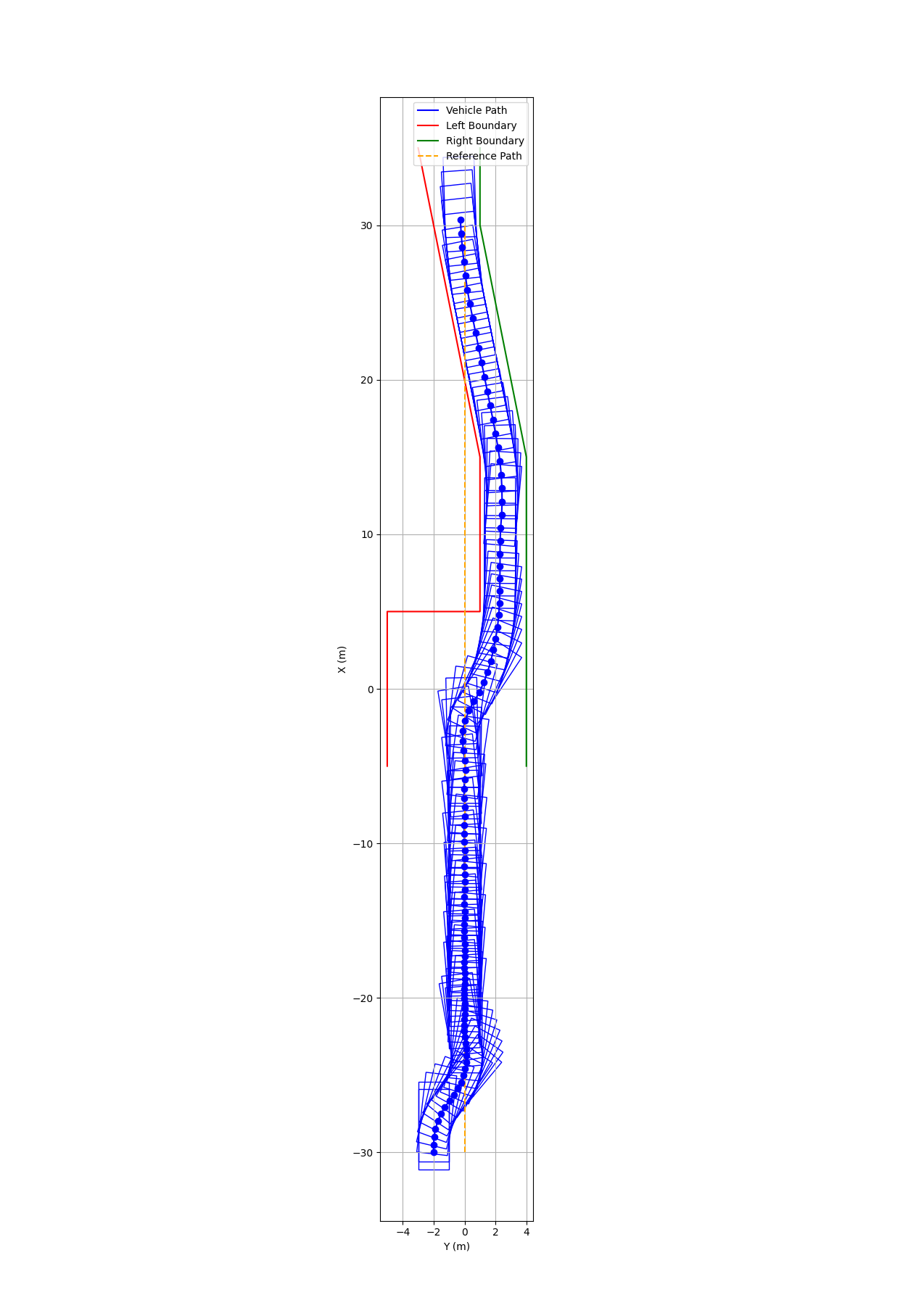
prob.boundary_left_bound.valid_dim = 6;
prob.boundary_left_bound.x[0] = -5.0; prob.boundary_left_bound.y[0] = -5.0;
prob.boundary_left_bound.x[1] = 5.0; prob.boundary_left_bound.y[1] = -5.0;
prob.boundary_left_bound.x[2] = 5.0; prob.boundary_left_bound.y[2] = 1.0;
prob.boundary_left_bound.x[3] = 15.0; prob.boundary_left_bound.y[3] = 1.0;
prob.boundary_left_bound.x[4] = 25.0; prob.boundary_left_bound.y[4] = -1.0;
prob.boundary_left_bound.x[5] = 35.0; prob.boundary_left_bound.y[5] = -3.0;

prob.boundary_right_bound.valid_dim = 5;
prob.boundary_right_bound.x[0] = -5.0; prob.boundary_right_bound.y[0] = 4.0;
prob.boundary_right_bound.x[1] = 5.0; prob.boundary_right_bound.y[1] = 4.0;
prob.boundary_right_bound.x[2] = 15.0; prob.boundary_right_bound.y[2] = 4.0;
prob.boundary_right_bound.x[3] = 30.0; prob.boundary_right_bound.y[3] = 1.0;
prob.boundary_right_bound.x[4] = 35.0; prob.boundary_right_bound.y[4] = 1.0;
The following notes apply:
left_boundandright_boundare the boundary names, consistent with the names defined during modelingvalid_dimis the number of valid points of the boundary, i.e., how many points define the boundary. It must be less than or equal tomax_dimdefined during modeling and greater than or equal to 2xandyare arrays of coordinates for each point on the boundary
- When
valid_dimis less than 2, the solver returns a distance of 0 - When
valid_dimis greater thanmax_dim, the solver usesmax_dimas the number of valid points - The computational cost is proportional to
valid_dim, so it is recommended to merge adjacent collinear points to reducevalid_dim
Results
Below is the problem setup for vehicle collision avoidance trajectory planning using the point-to-boundary collision avoidance feature:
- The vehicle starts at position (-30, 2) m, with the goal of tracking the reference line along the x-axis while avoiding the left and right boundaries (the boundary values are the
left_boundandright_bounddefined above) - The vehicle's optimized trajectory consists of 100 stages. At each stage, the vehicle avoids both boundaries (implemented through point-to-boundary collision avoidance using different corner points and interior points of the vehicle), with an avoidance distance of 0.3 m
Below is the trajectory planning result for boundary collision avoidance: